
Welcome to the WooCommerce EAN & UPC Code Generator — the simplest and most reliable way to create EAN-13, EAN-8, UPC-A, and Code128 barcodes for your WooCommerce products.
This powerful tool helps you generate accurate and consistent barcodes automatically, ensuring your entire product catalog stays clean, organized, and ready for inventory, scanning, POS systems, and marketplaces.
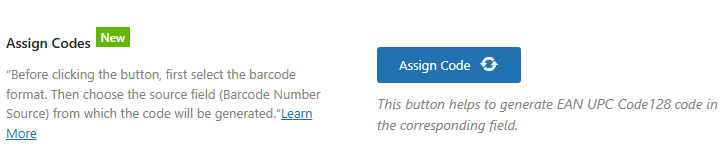
🚀 How It Works #
With just a few clicks, you can generate new barcode numbers and assign them directly to any product field, such as:
-
Barcode
-
SKU
-
GTIN
-
Any custom meta field
The plugin updates products one by one and shows you the progress in real time.
📝 How to Generate New EAN, UPC, or Code128 Barcodes #
Follow these simple steps:
1️⃣ Choose a Barcode Format #
Select the type of barcode you want to generate:
-
EAN-13
-
EAN-8
-
UPC-A
-
Code128
2️⃣ Select the Barcode Number Source #
Choose the field where the generated number will be stored.
For example:
-
SKU
-
Barcode field
-
GTIN custom field
-
Any product meta field
This is the field the plugin will update with your new barcode numbers.
3️⃣ Click the “Assign Code” Button #
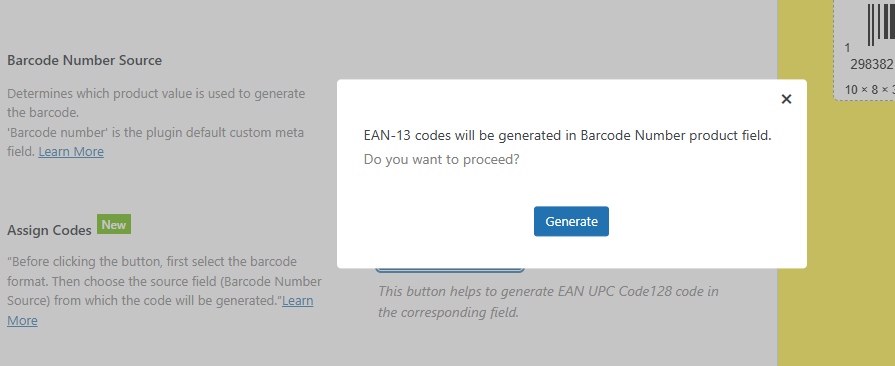
After clicking, the tool will:
-
Show the total number of products in your store
-
Display a progress bar
-
Generate and update each product automatically
All you need to do is wait a moment while the codes are being applied.
✔️ Completion Message #
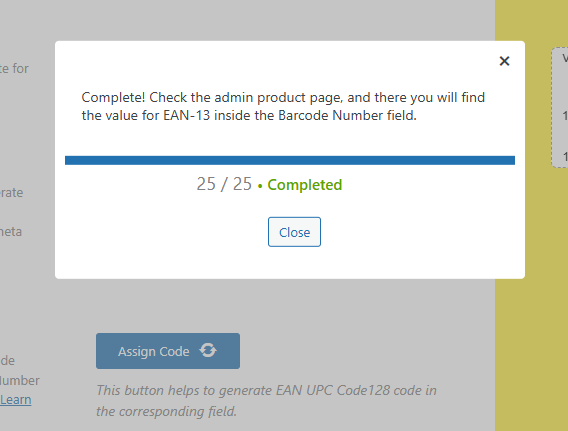
Once the generation is finished, you’ll see a Completed message confirming that:
-
All products were updated
-
All codes were successfully applied
🔍 Verify Your Updated Product Data #
Go to your Products page in WooCommerce.
You will see that the selected field (SKU, barcode field, GTIN, etc.) now contains your freshly generated barcode numbers — clean, consistent, and ready to use anywhere.
🎉 That’s It! #
You’ve successfully generated professional barcodes for your entire WooCommerce store.
The WooCommerce EAN & UPC Code Generator helps you:
-
Save time
-
Reduce manual input errors
-
Maintain a perfectly organized product catalog


